

Difficulty: Intermediate
TL;DR: Visual Builder Studio Issues can be the single system of record for a Fusion RICE backlog (Reports, Interfaces, Conversions, Extensions) — but only if everyone touching it tracks work the same way: PM, functional analyst, customer approver, developer. Below is the Epic/Task model, the Rice# and Component custom fields, and the deployment ladder we standardized on across our Fusion engagements in Visual Builder Studio Issues, plus the free, open Python tool we built to load a backlog of dozens or hundreds of RICE items into it in minutes instead of a day of manual data entry. Read this if you’re standing up delivery tracking for a Fusion implementation, or already running one that’s outgrown ad hoc use of Visual Builder Studio Issues.
Tested on / Prerequisites: Verified on Visual Builder Studio 26.10.0. We’ve applied the methodology below across multiple live Fusion implementations, and we test the loader against Visual Builder Studio’s Issues REST API v3 on a live CID tenant. It requires VBS Issues enabled on the project, a Personal Access Token scoped to it, and Python 3 with pandas, openpyxl, and requests.
Business Challenge
Every Fusion implementation produces the same kind of backlog: a list of RICE deliverables — Reports, Interfaces, Conversions, Extensions — each moving through functional design, technical design, build, and QA before the customer approves it and the technical team installs it into P1, P2, UAT, SIT, and PROD in sequence. Yet four different roles need to read that same backlog and come away with a different, correct answer: the Project Manager wants status by track and deployment readiness; the Functional Analyst is authoring designs and raising defects; the Customer Approver is signing off entry into each environment; the developer is building, installing, and closing defects.
Visual Builder Studio Issues can hold all of that, but only if everyone records work the same way. Without an agreed structure, consistency is the first casualty: someone types a Component as “P2P” on one Epic and “Procure to Pay” on another, skips a Task, or leaves an environment field stale after an install — and every board or report built on top of the backlog quietly stops being trustworthy. So we wrote the model down as an internal Ways of Working guide, applied it across our Fusion engagements, and — once a backlog grew past a few dozen items — stopped typing it in by hand and started loading it with a small Python tool instead. Both follow below: the methodology first, then the tool.
The RICE Delivery Model in Visual Builder Studio Issues
Vocabulary
A shared vocabulary is what keeps a board readable across roles:
| Term | What it means |
|---|---|
| RICE | Reports, Interfaces, Conversions, Extensions — the categories of technical deliverables on a Fusion implementation. Each individual deliverable is a RICE element or RICE item. |
| Epic | The container for one RICE deliverable. The unit the customer signs off on. |
| Task | A unit of work under an Epic — either a build activity (e.g. Development) or a deployment step. |
| Component | The functional/technical track an item belongs to (e.g. P2P, O2C, FA). Used to slice and filter. |
| Rice# | Custom field we configured for this project. The unique identifier for a deliverable, recorded on its Epic. |
| Release | A target Fusion environment in the promotion path: P1, P2, UAT, SIT, PROD. |
| Board | A visual, column-based view of issues, used to see status at a glance. |
| Sprint | A time-boxed planning period that build Tasks are scheduled into. |
The Epic/Task hierarchy
Each delivered RICE item is one Epic. Beneath it sit five fixed child Tasks that carry the build activity through to customer acceptance — Functional Design, Technical Design, Development, Functional QA, Customer QA — plus Defects, raised during QA and linked back to the Epic (or the Development Task) rather than reopening a build Task, so quality reporting stays clean and separate from build-activity status. The Epic represents the deliverable as a whole and is what the customer approves; the Tasks represent the individual activities that progress independently and get planned into sprints.
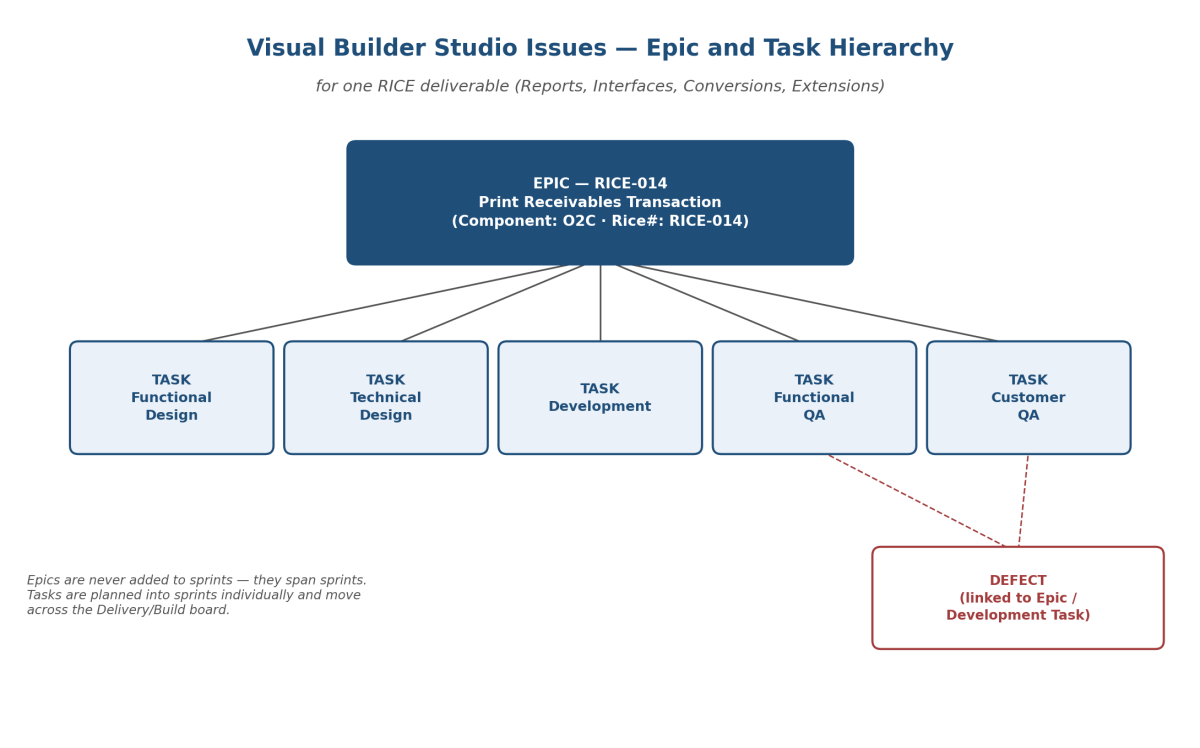
Here’s what a single deliverable looks like once it’s set up:
Epic: RICE-014 — Print Receivables Transaction
| Field | Value |
|---|---|
| Issue Type | Epic |
| Rice# | RICE-014 |
| Component | O2C (Order-to-Cash) — a receivables transaction print belongs to the order/receivables track |
| Release | P1 (current target environment for first build and playback) |
| Deployment Environment | P1 |
| Deployment Done? | Unchecked (approved for P1, not yet installed) |
| Summary | Print Receivables Transaction — formatted transaction print for the receivables process |
Child Tasks under this Epic: Functional Design (define the print layout, data fields, and triggering rules), Technical Design (BI Publisher template approach, data model, integration points), Development (build and unit-test the report and template), Functional QA (validate output against the design), Customer QA (customer reviews and accepts the deliverable). As work progresses, each Task moves through its statuses on the Delivery board, and the Epic’s deployment fields advance through each environment as the customer approves and the technical team installs.
Two optional issue types round things out: Story, used only if a team wants agile sizing on a piece of build work (otherwise the five Tasks are sufficient), and Feature, used only when one large RICE deliverable genuinely splits into independently shippable sub-parts. Most deliverables go Epic → Task directly — don’t force a Feature layer where it adds no value.
Component and Release: the two fields that make a backlog reportable
Two standard fields classify every Epic so the work can be filtered, reported, and routed. Component identifies the functional or technical track — the delivery tracks plus one cross-cutting technical track:
| Component | Use it for |
|---|---|
| P2P | Procure-to-Pay track |
| O2C | Order-to-Cash track |
| R2R | Record-to-Report / general ledger track |
| FA | Fixed Assets track |
| INV | Inventory track |
| CM | Cash Management track |
| Localization | Country/statutory localization work that applies across process areas |
| Infrastructure | Cross-track functional and technical infrastructure components |
Rule of thumb: work in a single functional process uses that track; work that underpins the platform as a whole uses Infrastructure. Release records which environment an issue currently targets — P1 (first build/playback), P2 (second build/playback), UAT (customer validation), SIT (cross-system integration testing), PROD. Release reflects environment context as a single value per issue, not a running history — instead, the deployment fields and each issue’s own audit log capture the full promotion trail.
Deployment tracking: the approve-then-deploy cycle
Deployment moves a deliverable up the P1 → P2 → UAT → SIT → PROD ladder, with the customer approving entry into each environment and the technical team performing the actual install. Two custom fields we added to the Epic carry this — they aren’t part of stock VB Studio Issues:
| Field | Meaning |
|---|---|
| Deployment Environment | Single-select — the environment currently being promoted into. |
| Deployment Done? | Checkbox. Unchecked = approved for that environment, not yet installed. Checked = installed. |
Each environment moves through two distinct events, owned by two different roles. First, the Customer Approver sets Deployment Environment to the target and leaves Deployment Done? unchecked. Then the technical team installs and checks it. Finally, when the customer approves the next environment, advance Deployment Environment and clear Deployment Done? again — in the same action, never as two separate steps. Leaving the checkbox checked after the environment changes makes the item read as “already installed” in the new environment when it isn’t, which silently drops it from the technical team’s deployment queue. Because these are standard single-value fields, you can build boards directly on them — for example, “everything approved for P1 but not yet deployed.”
Boards, sprints, and roles
Work is planned through sprints; the backlog is the holding area for everything not yet scheduled. Every Task starts in the backlog and stays there until the team commits it to a specific sprint — never both at once. In our operating model, Epics don’t go into sprints at all; they span sprints, and the Epic simply aggregates the progress of its Tasks. Three boards, fed by the same underlying issues, give each role the view it needs:
| Board | Shows | Who relies on it |
|---|---|---|
| Delivery / Build | The five activities by status | Analysts and developers |
| Deployment / Promotion | Issues grouped by Deployment Environment, split by Deployment Done? | Technical team (what to install) and customer (what to approve next) |
| Defects | Defects by status | Everyone — open quality items by environment or component |
Swimlanes by Component or Rice# let a team slice any board by track, scoped either to the active sprint or the wider backlog. So each role’s part in this: the Project Manager monitors progress across Epics and boards, tracking deployment readiness and defect trends; the Functional Analyst authors Functional Design Tasks, performs Functional QA, and raises Defects with clear reproduction detail; the Customer Approver performs Customer QA and approves entry into each environment; the Developer/Technical Team authors Technical Design, performs Development, installs into each environment, and resolves Defects. Everyone should also turn on VBS’s own issue-update email notifications in their profile — otherwise staying current means polling boards instead of receiving alerts.
Linking issues without over-linking
VBS supports several relation types; we standardize on a small set so the picture stays readable: Implements/Implemented By ties an activity Task to its parent Epic; Depends On/Dependency Of handles build sequencing, within an Epic or across Epics; Requires/Required By is reserved for genuine hard blockers, used sparingly; Discovered While Testing links a Defect back to the deliverable whose testing surfaced it; Relates To is a general, informational link. VBS records these relations and makes them navigable, but doesn’t enforce them — an unmet dependency doesn’t block work; it only informs planning.
Keeping it clean, and where the model currently stops
A few disciplines keep the system reliable as the backlog grows:
- Set Component and Rice# on every Epic from the moment the team creates it.
- Advance Deployment Environment one step at a time, and clear Deployment Done? in the same action.
- Use the agreed relation types rather than improvising new ones.
- Keep Defects as Defects, not Tasks.
- Keep the backlog prioritized, and only commit Tasks into a sprint the team actually intends to work that period.
- Write descriptive summaries.
A few limits are also worth knowing up front. In how we run this delivery process, Epics never go into sprints, so burn-down happens at the Task level and the Epic simply aggregates it. Boards display child issues (Tasks, Defects), not Epics, which is why deployment shows up on the fields the Tasks/Epic carry. And deployment fields show current state only — the full change history lives in each issue’s own audit trail, not in a report built for bulk historical tracking across many issues at once. In short, it’s a living model: as reporting needs evolve, we revisit and update it.
Load It in Bulk: a Free Tool for Visual Builder Studio Issues
That model works cleanly when someone enters a handful of Epics by hand. However, it breaks down the moment a new engagement hands over a backlog of 40, 80, or 120 RICE items as a spreadsheet: creating six issues per row (1 Epic + 5 Tasks) one field at a time in Visual Builder Studio Issues is slow, and it’s exactly where someone mistypes a Component or skips a Task. So we open-sourced the Python tool we use instead: vbs-uploader, free to clone and run against your own VBS tenant.
Setup
mkdir -p ~/vbs-uploader && cd ~/vbs-uploader
python3 -m venv venv
source venv/bin/activate
pip install --upgrade pip
pip install pandas openpyxl requests
Authenticate without leaving the token in shell history:
read -s -p "Paste VBS token: " VBS_TOKEN
export VBS_TOKEN
read -s hides the token as it’s typed, so only the bare export VBS_TOKEN command — never the token itself — lands in ~/.zsh_history. Generate the token from VB Studio → avatar → Preferences → Personal Access Tokens, scoped to the target project only — don’t reuse one PAT across projects — or every call comes back 403. Set an expiry on it so it rotates on a schedule instead of living forever, and in CI/CD pull it from the pipeline’s own secret store (masked, protected GitLab CI/CD variables, for example) rather than hardcoding it in a script or .yml file; revoke it immediately from the same Preferences page if it’s ever exposed. Note that --base-url isn’t the URL the VB Studio UI shows you: that one carries a #projects/... fragment, and the server never receives anything after #. The real base URL instead has the shape https://<host>/<org>/rest/<org>_<project>_<id>, with the identifier from Project Administration → Properties → Identifier.
The sample file
The repo ships a sample_issues.xlsx with five rows — three that load cleanly and two deliberately broken ones, so you can see the resolution logic before ever pointing the script at a real backlog:
| Summary | Description | Component | Release | Rice# |
|---|---|---|---|---|
| Print Receivables Transaction | Formatted transaction print for the receivables process | O2C | P1 | RICE-014 |
| Supplier Invoice Auto-Match Extension | Custom matching rules for 3-way match exceptions | P2P | UAT | RICE-021 |
| GL Journal Import Interface | (blank) | R2R | (blank) | RICE-030 |
| Asset Depreciation Report | Custom depreciation schedule report | FixedAssets-Bogus | P2 | RICE-042 |
| (blank) | No summary provided on purpose | INV | SIT | RICE-099 |
Only Summary and Component are required; Description and Release may be blank. Run --discover first to confirm the tenant’s real Components/Releases/defaults against the sample above, then dry-run it:
python3 vbs_issue_uploader.py --base-url <base-url> --discover
python3 vbs_issue_uploader.py --base-url <base-url> --excel sample_issues.xlsx --dry-run
What actually gets created from this file
- RICE-014 (Print Receivables Transaction) — valid:
O2Cis a real Component,P1a real Release. Creates 1 Epic (Summary prefixed toRICE-014 - Print Receivables Transaction,Component=O2C,Release=P1,customFields.RiceNumber=RICE-014) plus its 5 child Tasks (Functional Design, Technical Design, Development, Functional QA, Customer QA), each summary based on that same prefixed title with its activity name appended. - RICE-021 (Supplier Invoice Auto-Match Extension) — valid the same way, with
Component=P2P,Release=UAT. 1 Epic + 5 Tasks. - RICE-030 (GL Journal Import Interface) — valid:
Component=R2Ris real, andReleaseis blank, so the script falls back to the product’sdefaultRelease(P1) instead of guessing or rejecting the row. 1 Epic + 5 Tasks. - RICE-042 (Asset Depreciation Report) — skipped:
FixedAssets-Bogusisn’t a Component name the tenant actually has (the real one isFA). Logged with the reason, nothing created. - RICE-099 — skipped: no Summary. Logged with the reason, nothing created.
So a --limit 1 smoke test creates exactly one Epic (RICE-014) with its 5 Tasks nested under it; the full run against this sample file creates 3 Epics and 15 Tasks — 18 issues in total — and writes a sample_issues.results.csv next to the Excel file recording which rows it created, skipped, or failed, along with the resulting issue IDs. Swap in a real backlog and the same three commands (--discover → --dry-run → full run) scale to however many rows it has.
What the script handles so you don’t have to
Two REST behaviors matter once you go past the sample file. First, on our tenant, POST /issues/v3/issues requires seven fields (summary, product, component, severity, status, priority, release), and severity/status/priority/release each need both id and value — the API silently treats a lone id as missing. Second, linking each Task to its Epic isn’t one call: POST .../subissues returns an HTTP 500 on our tenant when you ask it to create and link in one request, so instead the script creates the Task via POST /issues/v3/issues and links it with PUT /issues/v3/issues/{taskId}/parentissue. It also sets customFields.DeploymentEnv to the Epic’s own Release at creation time on every Epic and Task — not a real feature yet (it isn’t an Excel column), but a required workaround for a platform bug where an untouched DeploymentEnv sticks at "---" and then rejects any later write (see Gotchas).
A companion vbs_export_issues.py pulls every issue on the project back into Excel — id, type, Component/Release/status names, cf_RiceNumber, cf_DeploymentEnv, parent issue id, and more, sorted by id so each Epic naturally groups with its Tasks. A cleanup_vbs_test_issues.py closes out test/POC issues created while validating the loader, since there’s no delete endpoint for issues in this API.
Gotchas / Production notes
Process discipline (the part no API enforces for you):
- Set Component and Rice# on every Epic from the moment it’s created — this is what makes boards and reports sliceable later.
- Advance Deployment Environment one step at a time, and clear Deployment Done? in the same action — never leave it checked against a new environment.
- Keep Defects as Defects, not Tasks, or quality reporting quietly becomes inaccurate.
- Deployment fields show current state, not history — the audit trail lives in each issue’s log, not in a report designed for bulk historical tracking across many issues.
API and tooling gotchas (confirmed by live testing, not assumptions):
- On our tenant,
create()requires all seven fields or you get a 400 naming exactly which one is missing — Oracle’s public REST reference doesn’t document this, so treat it as observed behavior, not a guaranteed contract. severity/status/priority/releaseneed bothidandvalue— the API silently rejectsidalone as if it were absent.- The create-form endpoint doesn’t expose custom fields on our tenant; only
repository.customFieldsdoes — always--discoverfirst. POST .../subissuesdoesn’t reliably create-and-link a Task in one call — create it, thenPUT .../parentissue.- Leaving
DeploymentEnvuntouched at creation poisons the issue at"---"; every later write to that field then fails. This looks like a genuine platform bug — the write-path rejects the read-path’s own default — and is worth an Oracle Support SR, since it can affect issues created by hand in the UI too. - There’s no delete-issue endpoint in this API — only relationship-removal endpoints. The closest thing to “archive” is
Status=CLOSED+Resolution=WONTFIX. - The loader doesn’t check for an already-loaded Rice# before creating — re-running the same Excel file creates duplicates. Treat each run as one-shot until we add that check.
- A custom field value can look blank in the VB Studio UI right after creation — that’s a UI refresh quirk; a fresh
GETon the issue confirms it’s already there server-side.
How to verify
- Compare the
--discoveroutput’s Components and Releases against your Ways of Working vocabulary before loading anything for real. - Read the
--dry-runoutput against the sample table above: three rows should resolve cleanly, and the loader should skip the other two, each with a stated reason. - After a
--limit 1smoke test, open the Epic in VB Studio and confirm all 5 Tasks are nested under it and Rice# is populated. - Check the results CSV for created/failed/skipped counts and issue IDs after a full load.
- Run a fresh
GETon a created issue to confirmcustomFields.RiceNumberround-tripped as a flat string, independent of what the UI currently shows. - Run
vbs_export_issues.pyafterward and cross-check the export against the source backlog, row for row. - On the Deployment/Promotion board, confirm items read “approved, not yet installed” or “installed” correctly for their current environment.
Conclusion
A documented Epic/Task model with two custom fields (Rice#, Component) and a disciplined deployment ladder is what lets four different roles read the same Fusion delivery backlog in Visual Builder Studio Issues and get the right answer out of it. At real backlog scale, loading it by hand is where that discipline breaks down first — which is why we load it with a free, open script instead, turning a day of manual data entry into a --discover → --dry-run → --limit 1 → full-run sequence that takes minutes and never mistypes a Component.
Standing up delivery tracking for your own Fusion implementation in Visual Builder Studio Issues, or watching an ad hoc setup buckle under a growing backlog? We’ve built and run this exact Ways of Working across multiple enterprise engagements, and we can do the same for you. Reach out at info@cidsolutions.co.il or WhatsApp — let’s get it solved.
Want the methodology and the tooling before you reach out? Both are below.
Full VBS Issues Management Methodology Document:
💻 vbs-uploader on CID Software Solutions GitLab
Related posts:
- Improve development and maintainability of Visual Builder AppUIs by utilizing code sharing
- CID Fusion Query v3.0.0 — Free Chrome Extension for Oracle Fusion Developers and Business Analysts
Reference docs: